
Your support team probably answers some of the same questions every day. An AI chatbot can help customers find those routine answers while your team handles the issues that need attention. The key is to give it reliable business information and make it easy to reach a person when an answer is missing.
Which customer support tasks are suitable for automation?
Start with the questions your team can answer consistently: opening hours, available services, inquiry steps and published policies. A useful chatbot gives a short answer and points the customer to the next step. Sending an entire policy document rarely helps someone who needs one detail.
- Answer recurring questions using current business information.
- Guide visitors to the relevant service or support channel.
- Collect a short description of an issue for follow-up.
- Explain a documented process without promising an outcome.
Treat account-specific questions separately. Looking up an order or support ticket may require a customer to sign in and an integration with your system. Decide how that access will work before adding it to a public support assistant.
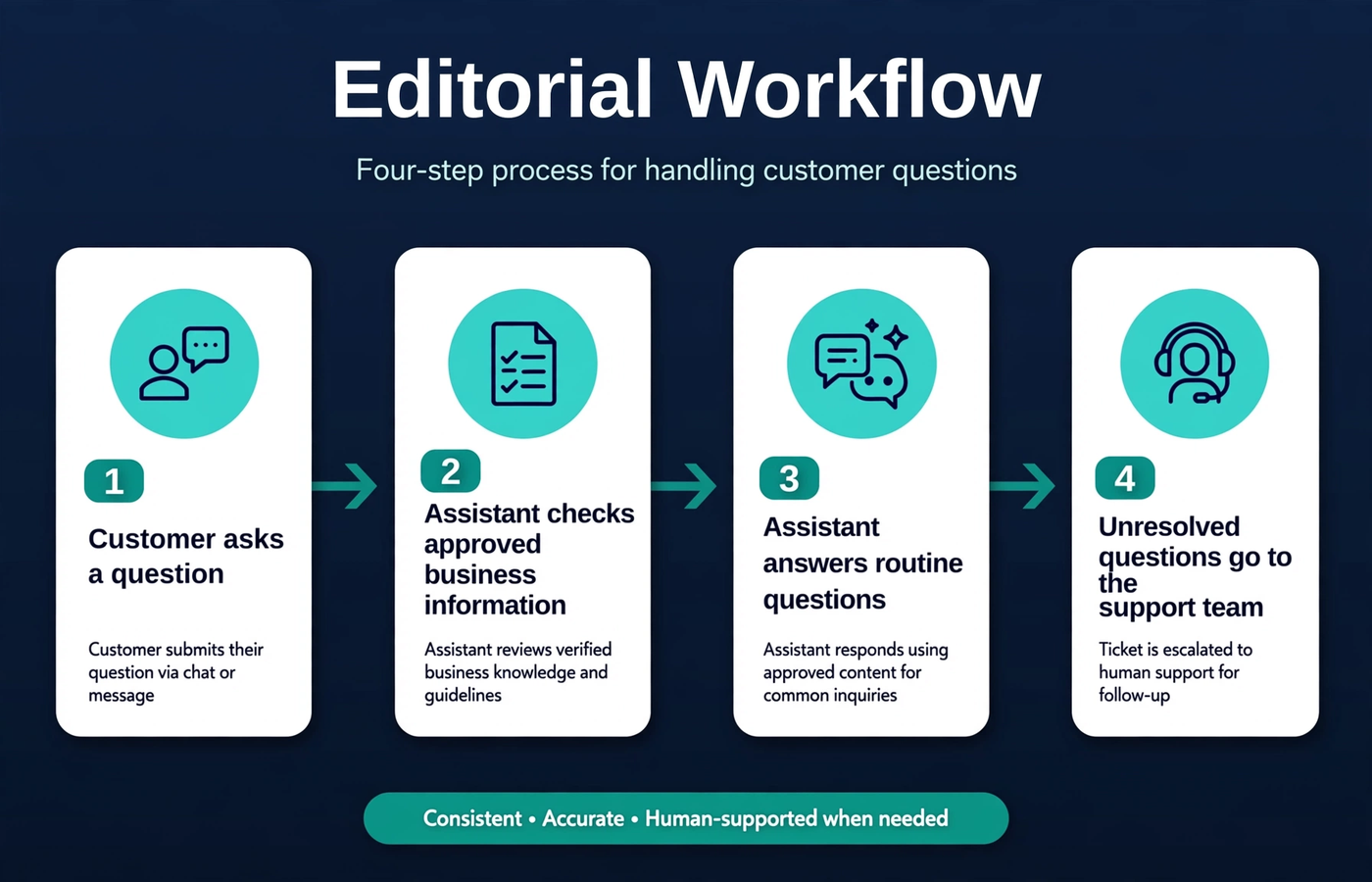
A support assistant answers routine questions and routes unresolved requests to the team.
When should the chatbot involve a person?
Customers should not have to argue with a chatbot to reach your team. Offer a handoff when someone asks for a person, the bot cannot find an answer or the conversation is going in circles. Complaints, disputed charges and requests for an exception need a team member who can make a decision.
Be clear about what happens after the handoff. Is the customer opening a ticket, requesting a callback or joining a live conversation? If nobody is available, show the real support hours and contact options. Only confirm that a request has been sent after the receiving system accepts it.
A practical customer support chatbot workflow
- The customer asks a question.
- The assistant checks approved business information.
- It answers a supported routine question and offers a useful next step.
- Unresolved requests go to the support team through the agreed handoff process.
For example, a visitor asks whether a service is available on weekends. The assistant can answer from your published schedule. If they then ask for an exception on a particular date, it should help them send an inquiry to the team rather than promise an arrangement it cannot confirm.
Keep answers grounded in business information
Before connecting your content, check it for old prices and conflicting policies. Choose which source the chatbot should trust when two pages disagree, and assign someone to keep it current. If the answer is missing, the bot should say so and offer help from your team.
This needs input from the people who know your services, not just the development team. A polished chat window cannot fix unclear or outdated business information.
Make the handoff useful for the customer and the team
A good handoff saves the customer from starting again. If your integration supports it, pass along a short summary and the question that still needs an answer. Explain what information will be shared, collect only what the team needs and test that the request reaches the right place.
- Keep the option to contact a person easy to find.
- Explain whether the request is a ticket, live transfer or follow-up inquiry.
- Preserve useful context when the integration permits it.
- Provide an alternative when the handoff system fails.
Answering questions is different from taking actions
Explaining a refund policy is one thing; issuing a refund is another. If the chatbot can change records or make commitments, it needs the right permissions, identity checks and confirmation steps. Decide those boundaries before building and test what happens when an action fails.
How to measure whether the assistant helps
Read a sample of real conversations after launch. Did customers get an accurate answer? Did unresolved questions reach a person? Look for repeated questions and feedback as well as usage numbers. Fewer handoffs are only a good sign if customers are actually getting help.
Use what you learn to improve the answers before adding more tasks. Keep someone responsible for reviewing the assistant whenever a policy or connected system changes.
Frequently asked questions
Can an AI chatbot replace the entire support team?
Start by helping your team with routine questions. People should still handle exceptions, decisions and issues the assistant cannot resolve. Replacing the whole team is not a sensible assumption for a first release.
Can it connect to our helpdesk or CRM?
It may be possible if your platform provides the necessary APIs and access. Tell the developer exactly what the bot needs to read or do, then check permissions, sign-in requirements and failure handling before committing to the integration.
What if it cannot answer a question?
It should explain that it cannot answer and offer a useful next step, such as a support ticket or contact form. Customers need a clear way forward rather than a guess presented as fact.
Choose an assistant around your support workflow
Identify your recurring questions and the situations that require a person. Explore Devxer’s AI chatbot and assistant development services to discuss a focused support solution. For a starting-scope checklist, read Planning an AI Chatbot for Customer Support.

